
A premium home cinema can deliver spectacular visuals and immersive sound, yet complicated controls may discourage people from using it regularly. When several remotes, confusing input selections, and unfamiliar menus stand between viewers and their favorite movies, entertainment becomes unnecessarily frustrating.
Designing an intuitive experience requires thoughtful equipment selection, clear navigation, and practical operating instructions. The goal is to make sophisticated technology feel approachable, allowing children, guests, and other household members to enjoy the system without technical assistance.
Make the Remote Control Easy to Understand
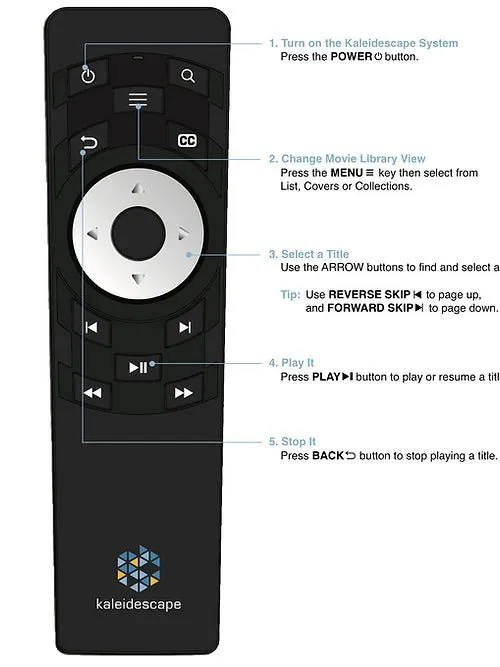
A remote should help viewers perform common tasks without searching through unfamiliar buttons or complicated menus. Essential functions such as play, pause, navigation, and returning to previous screens deserve priority. The Remote Control Kremote-40 offers dedicated controls for navigating compatible Kaleidescape Strato movie players. Its functionality includes movie selection, playback commands, searching, and closed-caption access.
Before selecting a remote, homeowners should confirm compatibility with their specific equipment. A straightforward control arrangement can reduce confusion, especially when several family members share the same entertainment space.
Select a Player That Matches Viewing Habits
An intuitive home cinema begins with equipment that meets actual household needs. A smaller entertainment space may not require the same storage capacity or system arrangement as a dedicated theater. The Kaleidescape Strato E provides 4K Dolby Vision playback, lossless audio support, and built-in solid-state storage. It can operate independently or integrate with compatible Kaleidescape server-based systems.
Its standalone capabilities may appeal to viewers who prefer a compact initial arrangement. However, buyers should consider storage limitations, display compatibility, and future expansion requirements before choosing any player.
Reduce the Number of Steps Before Playback
Movie night should not require a lengthy sequence of technical adjustments. Excessive menu navigation and repeated input changes can make otherwise capable systems inconvenient. Homeowners should identify the actions required to begin watching a movie and determine whether any can be simplified.
Compatible automation systems may coordinate display operation, audio input selection, and room lighting through predefined activities. Nevertheless, automation should remain predictable. If a programmed command fails, viewers should still understand how to operate essential devices. The objective is fewer unnecessary steps, not maximum automation.
Organize Movie Navigation Around Real Preferences
A digital movie collection becomes easier to use when viewers can locate familiar titles without excessive searching. Collections, cover artwork, and supported browsing options can help household members identify movies according to personal preferences. Families may benefit from organizing viewing choices around frequently watched favorites or appropriate selections for different ages.
However, available organizational and parental-control features depend on the platform and its current capabilities. Homeowners should explore the supported interface before creating complicated arrangements. A simple navigation structure often provides greater everyday value than an extensive system that nobody understands.
Design Controls for Different Generations
Not everyone approaches entertainment technology with the same confidence. Younger viewers may be comfortable navigating digital interfaces, while occasional users might prefer familiar physical controls.
A practical home cinema should accommodate these differences.
Consider the following usability improvements:
-
Keep essential remote functions easy to identify.
-
Provide clear instructions for changing entertainment sources.
-
Make volume adjustment accessible without complex menus.
-
Explain how to enable supported captions.
-
Maintain a straightforward method for turning equipment off.
Testing these tasks with different household members can reveal confusing steps that experienced users might overlook.
Prevent Common Control Problems
Many home cinema frustrations arise from small configuration issues rather than equipment failures. Incorrect input selection, depleted remote batteries, obstructed infrared receivers, and network interruptions can all interfere with normal operation. Homeowners should understand which devices depend on wireless signals, wired connections, or compatible control processors.
Keeping equipment documentation accessible can simplify basic troubleshooting. During installation, confirm that remote commands reach the intended devices and that important functions remain available from normal seating positions. Addressing these details early reduces interruptions and prevents avoidable service requests.
Teach Everyone How to Use the System
A professionally installed cinema should include a practical demonstration of everyday operation. Rather than focusing exclusively on technical specifications, training should cover the actions viewers will perform most frequently. Ask family members to start a movie, adjust the volume, enable captions where supported, and return to normal television viewing.
Simple written instructions can provide reassurance when guests or less experienced users operate the system independently. Training should also explain basic troubleshooting boundaries, including when professional assistance is appropriate. A successful demonstration ends when users feel comfortable operating the equipment themselves.
Conclusion
The quality of a home cinema is measured not only by its technical capabilities but also by how comfortably people can enjoy them. Clear controls, familiar navigation, dependable connections, and useful operating instructions make premium entertainment more accessible. Epic Systems offers Kaleidescape equipment and integration services that homeowners can consider when planning intuitive entertainment environments. Ultimately, the most effective technology is the kind that disappears into the experience, allowing viewers to concentrate on the movie instead of the equipment controlling it.